Ask an HR executive at a mid-size Indian company what their WhatsApp looks like on the 1st of the month, and you’ll usually hear some version of the same thing: forty messages asking where the payslip is, three asking why last month’s leave wasn’t approved, and one from a field employee who wants to know if his attendance for a rainy Tuesday got marked correctly. This is what happens when “employee self-service” means a portal that only serves up a PDF.
Most HRMS platforms ship an ESS module. Very few of them actually reduce the volume of HR queries, because the module was built to check a feature-list box, not to answer the five or six things employees genuinely ask for on repeat.
What an employee self-service portal usually offers, and why it falls short
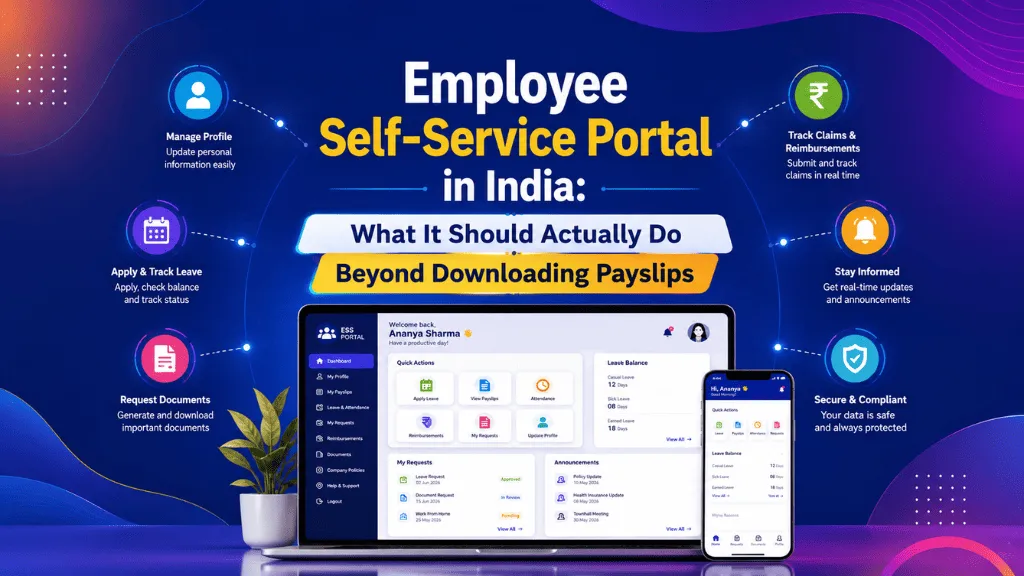
Log in, download payslip, apply for leave, see holiday calendar. That’s the standard set, and it covers maybe half of what an HR inbox actually deals with. The other half — attendance disputes, document requests, reimbursement status, “did my regularisation get approved” — still routes through a person, because the portal wasn’t built to handle it.
The gap shows up hardest with field and shift teams: delivery staff, factory floor workers, site engineers. A payslip download portal is close to useless for someone who needs to mark attendance from a client site at 7 AM and check, from the same phone, whether yesterday’s late check-in got flagged.
The features that actually take load off HR
Attendance regularisation from the app, not an email thread
When a geo-tagged check-in fails or someone forgets to clock out, the fix shouldn’t be a message to HR asking for a manual correction. It should be a regularisation request raised from the same screen, sent to the manager for approval, and reflected in the attendance record without anyone touching a spreadsheet.
Leave applied against a real-time balance
Employees apply for leave more carefully, and HR fields fewer “how many days do I have left” questions, when the balance shown is accurate at the moment of applying, not synced overnight from a separate system.
Documents beyond the payslip
Form 16, appointment letter, increment letter, experience certificate on exit — these get asked for constantly and usually involve someone in HR digging through a folder. An ESS portal that stores the full document trail per employee removes that entirely.
A place to raise a query that isn’t WhatsApp
A simple ticket or query log inside the portal, even a basic one, gives HR a record of what’s being asked and closes the loop for the employee visibly, instead of an answer buried in a chat thread that gets deleted six months later.
What field and shift-based teams need differently
Office-based ESS design assumes a laptop, a stable login, and someone checking the portal once a week. None of that holds for a field sales team covering three districts or a shift-based production line. For that workforce, the self-service layer has to work as a lightweight mobile app first: large buttons, low data usage, and regional language support, because a portal that only works well in English and on a laptop simply won’t get used by the people who need it most.
What adoption actually looks like in month one
The rollout mistake most companies make is announcing the portal once, in an email nobody reads, and then measuring “adoption” by whether anyone complained. A better signal is simpler: watch how many leave requests and attendance regularisations get raised through the portal versus over email or WhatsApp in the first three weeks. If that number stays low, the portal usually isn’t the problem, the onboarding of the portal itself is. Employees need to be shown, on their own phone, in the first week of joining, not handed a login and a PDF guide.
A useful data point here: teams that get ESS access on day one, alongside their laptop and ID card, tend to use it as the default channel within the first pay cycle. Teams that get it “sometime after probation” mostly default back to asking HR directly, because the habit never formed.
Questions worth asking in an HRMS demo
Before signing off on any HRMS, it’s worth asking the vendor to actually demonstrate three things live rather than describe them: can an employee regularise a missed attendance punch from their phone in under a minute, can they see their updated leave balance the same second a manager approves a request, and can they pull their own Form 16 without emailing anyone. If any of those needs a workaround or a “yes, that’s on our roadmap,” the ESS module is a payslip portal wearing a bigger name.
This is the standard IntelloHRM’s self-service layer is built against, because attendance, leave and documents live in the same system rather than three integrations bolted together. If you’re evaluating what a payroll and payslip setup should cover end to end, we’ve laid out the fuller picture here.
There’s also a quieter benefit that rarely makes the sales pitch: an ESS layer that logs regularisation requests, leave applications and document downloads with timestamps gives HR a clean audit trail for its own records, which matters the day an EPFO or ESIC query comes in and someone needs to show exactly when an employee’s details were updated, not just that they were.
An ESS portal is only worth the name if it actually removes work from HR’s plate. Payslip downloads were never the hard part.
See how IntelloHRM‘s employee self-service works for office and field teams alike.